Shared SSH sessions for you and your AI agents
Tandem is a Windows app that keeps your SSH connections open in a small background service on your PC. You work in them from Tandem's viewer, and Claude Code (or any other MCP client) can work in the same sessions at the same time. You watch the agent type, you can take over whenever you like, and every session is saved to disk with a note of who typed each command.
Download for Windows64-bit Windows 10 and 11
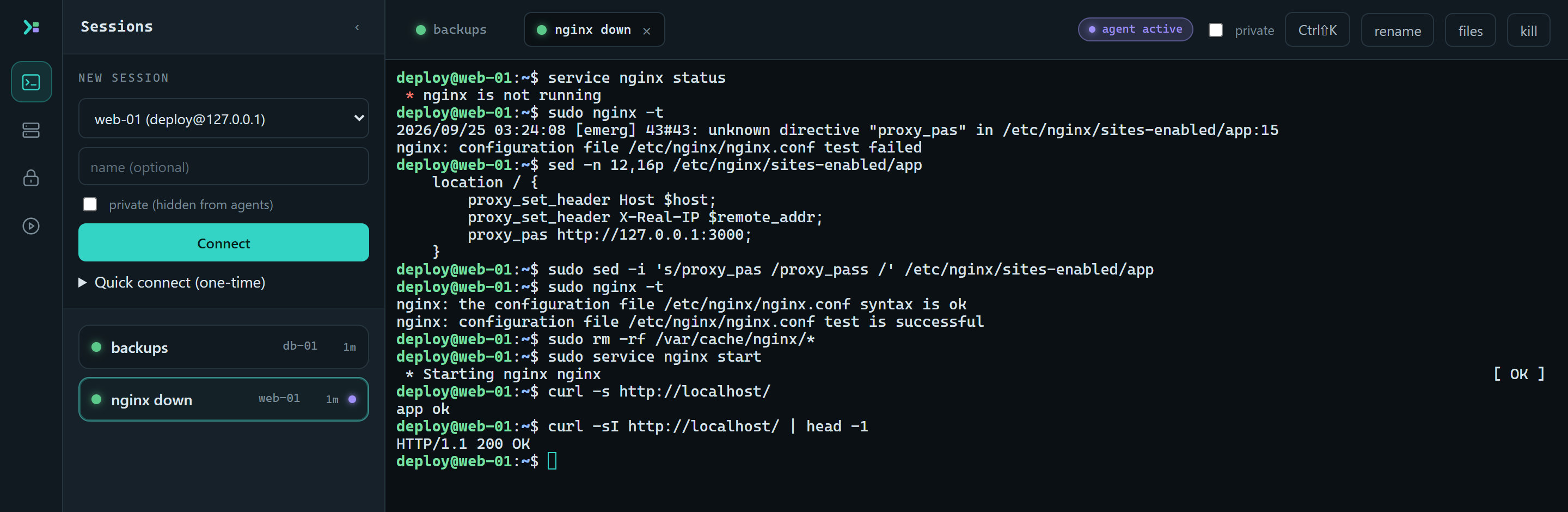
web-01. The sed line in the middle was typed by a person in the viewer; everything else was the agent.What gets recorded
This is the log for that session. Claude Code found the typo in the nginx config, the fix was typed in by hand, and the agent had to ask before clearing nginx's cache because the host is set to guarded.
| Time (UTC) | Who | What |
|---|---|---|
| 03:24:00 | claude-code | opened session web-01, "nginx down" |
| 03:24:07 | claude-code | typed service nginx status |
| 03:24:08 | claude-code | typed sudo nginx -t |
| 03:24:10 | claude-code | typed sed -n 12,16p /etc/nginx/sites-enabled/app |
| 03:24:13 | you | ran sudo sed -i 's/proxy_pas /proxy_pass /' /etc/nginx/sites-enabled/appexit 0 |
| 03:24:15 | claude-code | typed sudo nginx -t |
| 03:24:18 | claude-code | asked to run sudo rm -rf /var/cache/nginx/* |
| 03:24:21 | claude-code | was approved to run sudo rm -rf /var/cache/nginx/* |
| 03:24:21 | claude-code | typed sudo rm -rf /var/cache/nginx/* |
| 03:24:23 | claude-code | typed sudo service nginx start |
| 03:24:25 | claude-code | typed curl -s http://localhost/ |
| 03:25:04 | claude-code | typed curl -sI http://localhost/ | head -1 |
Show the raw lines
{"type":"session-created","ts":"2026-09-25T03:24:00.248Z","sessionId":"b40e0460","actor":"agent:claude-code","hostAlias":"web-01","name":"nginx down"}
{"type":"input","ts":"2026-09-25T03:24:07.053Z","sessionId":"b40e0460","actor":"agent:claude-code","data":"service nginx status\r"}
{"type":"input","ts":"2026-09-25T03:24:08.828Z","sessionId":"b40e0460","actor":"agent:claude-code","data":"sudo nginx -t\r"}
{"type":"input","ts":"2026-09-25T03:24:10.623Z","sessionId":"b40e0460","actor":"agent:claude-code","data":"sed -n 12,16p /etc/nginx/sites-enabled/app\r"}
{"type":"command","ts":"2026-09-25T03:24:13.690Z","sessionId":"b40e0460","actor":"human:viewer-1","command":"sudo sed -i 's/proxy_pas /proxy_pass /' /etc/nginx/sites-enabled/app","exitCode":0,"durationMs":7}
{"type":"input","ts":"2026-09-25T03:24:15.865Z","sessionId":"b40e0460","actor":"agent:claude-code","data":"sudo nginx -t\r"}
{"type":"guardrail","ts":"2026-09-25T03:24:18.043Z","sessionId":"b40e0460","actor":"agent:claude-code","decision":"approval-requested","tool":"send_input","detail":"sudo rm -rf /var/cache/nginx/*"}
{"type":"guardrail","ts":"2026-09-25T03:24:21.512Z","sessionId":"b40e0460","actor":"agent:claude-code","decision":"approved","tool":"send_input","detail":"sudo rm -rf /var/cache/nginx/*"}
{"type":"input","ts":"2026-09-25T03:24:21.513Z","sessionId":"b40e0460","actor":"agent:claude-code","data":"sudo rm -rf /var/cache/nginx/*\r"}
{"type":"input","ts":"2026-09-25T03:24:23.706Z","sessionId":"b40e0460","actor":"agent:claude-code","data":"sudo service nginx start\r"}
{"type":"input","ts":"2026-09-25T03:24:25.890Z","sessionId":"b40e0460","actor":"agent:claude-code","data":"curl -s http://localhost/\r"}
{"type":"input","ts":"2026-09-25T03:25:04.846Z","sessionId":"b40e0460","actor":"agent:claude-code","data":"curl -sI http://localhost/ | head -1\r"}events.jsonl for the session in the screenshot. The full file also has an entry per keystroke, window resize and connection change; those are left out here.How it works
Neither you nor the agent opens an SSH connection yourselves. Tandem's service holds them all, and both of you attach to it. Because every keystroke passes through one place, it can all be recorded and attributed, and a session keeps running when you close the window or restart the agent.
What the agent can and can't do
It can
- open sessions on hosts you've set up, or add new ones
- read the screen as rendered text, so
topandvimmake sense to it - run a command and get back its output and exit code
- send raw keys to interactive programs
- wait for a pattern to appear, or for output to go quiet
- list, read, write, rename and delete files over SFTP
It can't
- see password or 2FA prompts, or what you type into them
- see sessions you've marked private
- accept a server whose host key has changed
- change its own guardrail settings or approve its own requests
- unlock the password vault
- read old recordings
Guardrails
Each host gets a mode, with a default for the rest. Only you can change them, from the viewer.
| unrestricted | The agent can do anything you could do in the session. This is the default. |
|---|---|
| guarded | Destructive commands and file deletions wait for you to approve them in the viewer, and anything on the deny list is refused outright. If nobody answers within two minutes, the answer is no. |
| read-only | The agent can look at screens, output and files but can't change anything. |
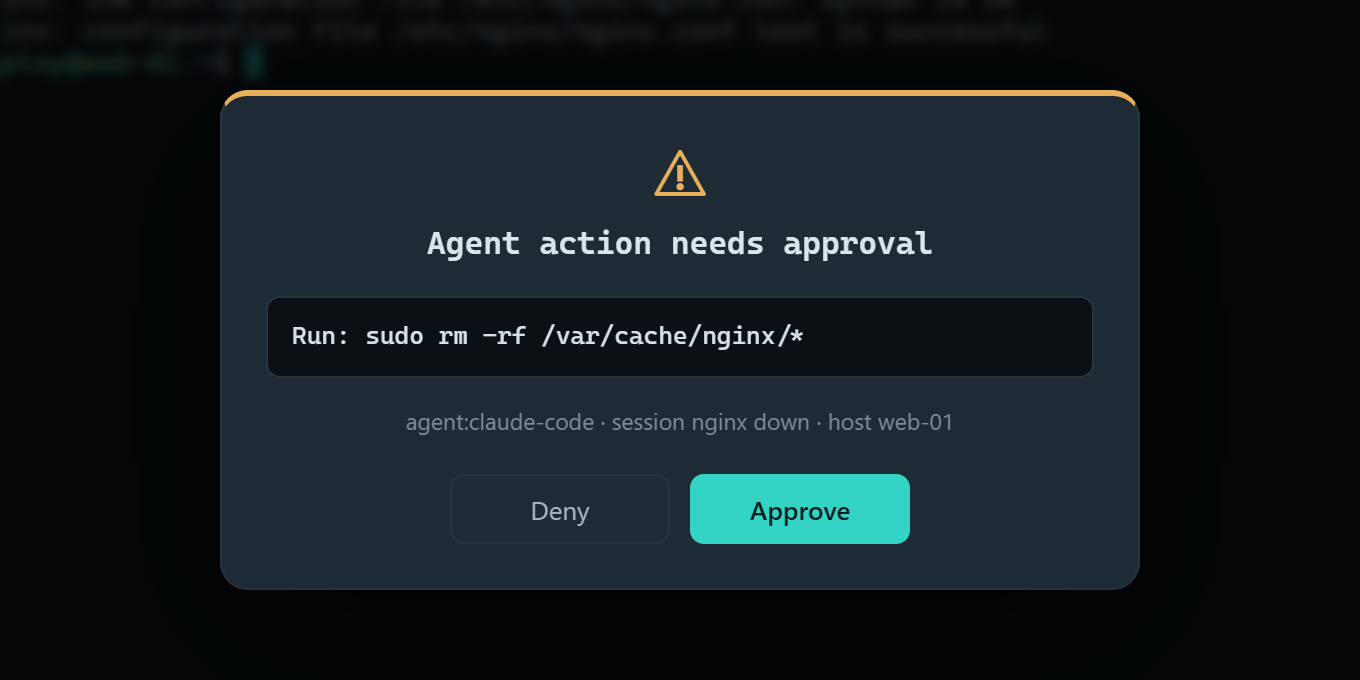
rm -rf.Replay
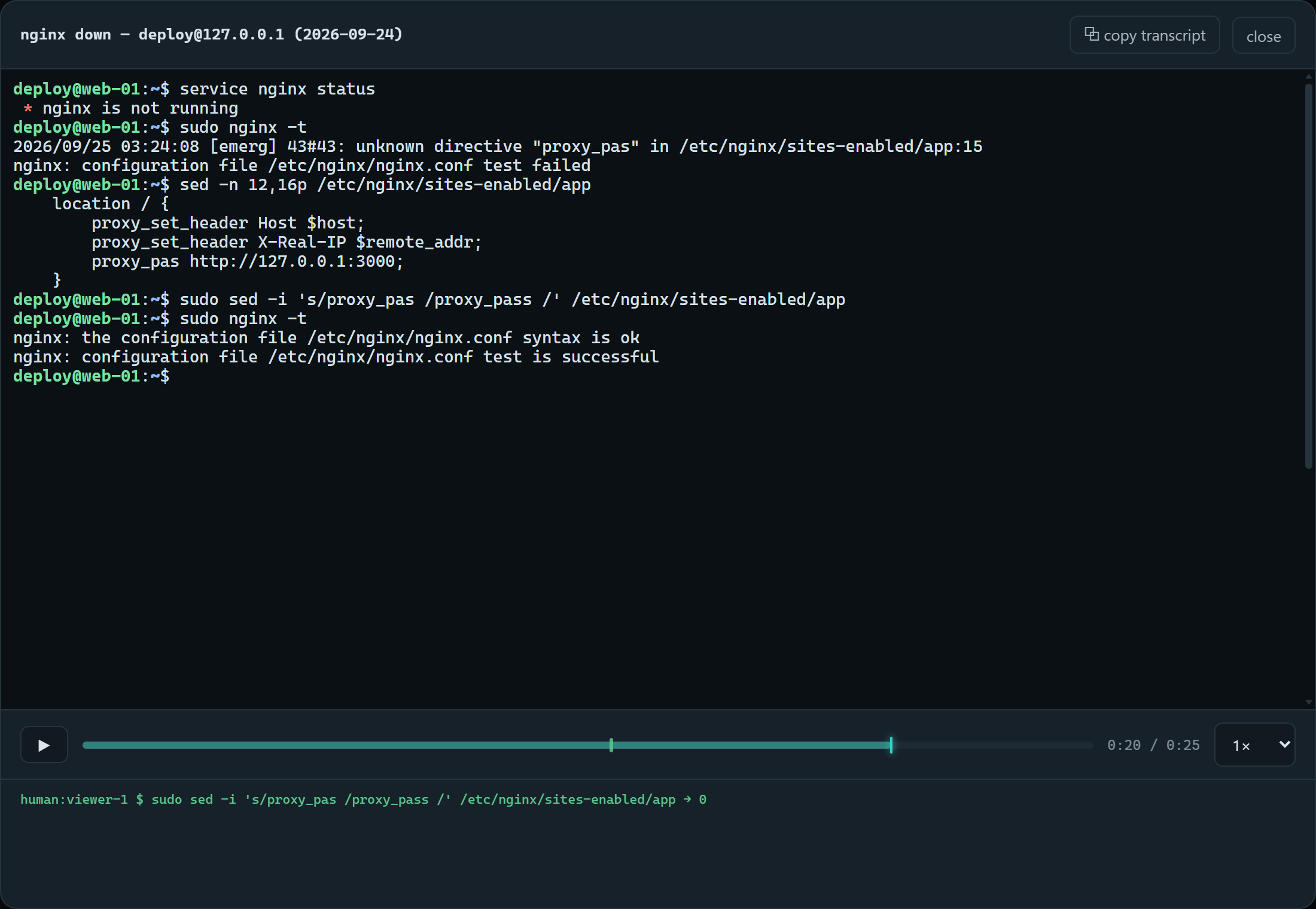
Every session can be played back in the viewer, with a timeline you can click to jump around. Commands are marked on the timeline along with who ran them. You can also copy a session out as plain text to give to another agent.
Connecting Claude Code
Tandem listens on 127.0.0.1:7440. The agent's token is created on first run in%LOCALAPPDATA%\SharedSSH\token.
claude mcp add tandem --transport http http://127.0.0.1:7440/mcp --header "Authorization: Bearer <token>"Other clients: connecting an agent.
Also
- Dropped connections
- Tick "persistent" on a host and its sessions run inside tmux on the server. Tandem reconnects on its own after a network drop, for up to ten minutes.
- Private sessions
- Mark a session private and agents can't see it at all. It's still recorded for you.
- Jump hosts
- One hop through a bastion, including any hosts you import from
~/.ssh/config. - Telnet
- For serial console servers and older network gear. It's plaintext, so keep it on a management network.
- Password vault
- For hosts that only take passwords. Encrypted with AES-256-GCM under a master password that's never stored.
- Stays on your PC
- There's no account and no cloud service. Recordings go in
Documents\SSH Recordings.